
Nano Banana 2: 12 professional ways to create and edit images with AI
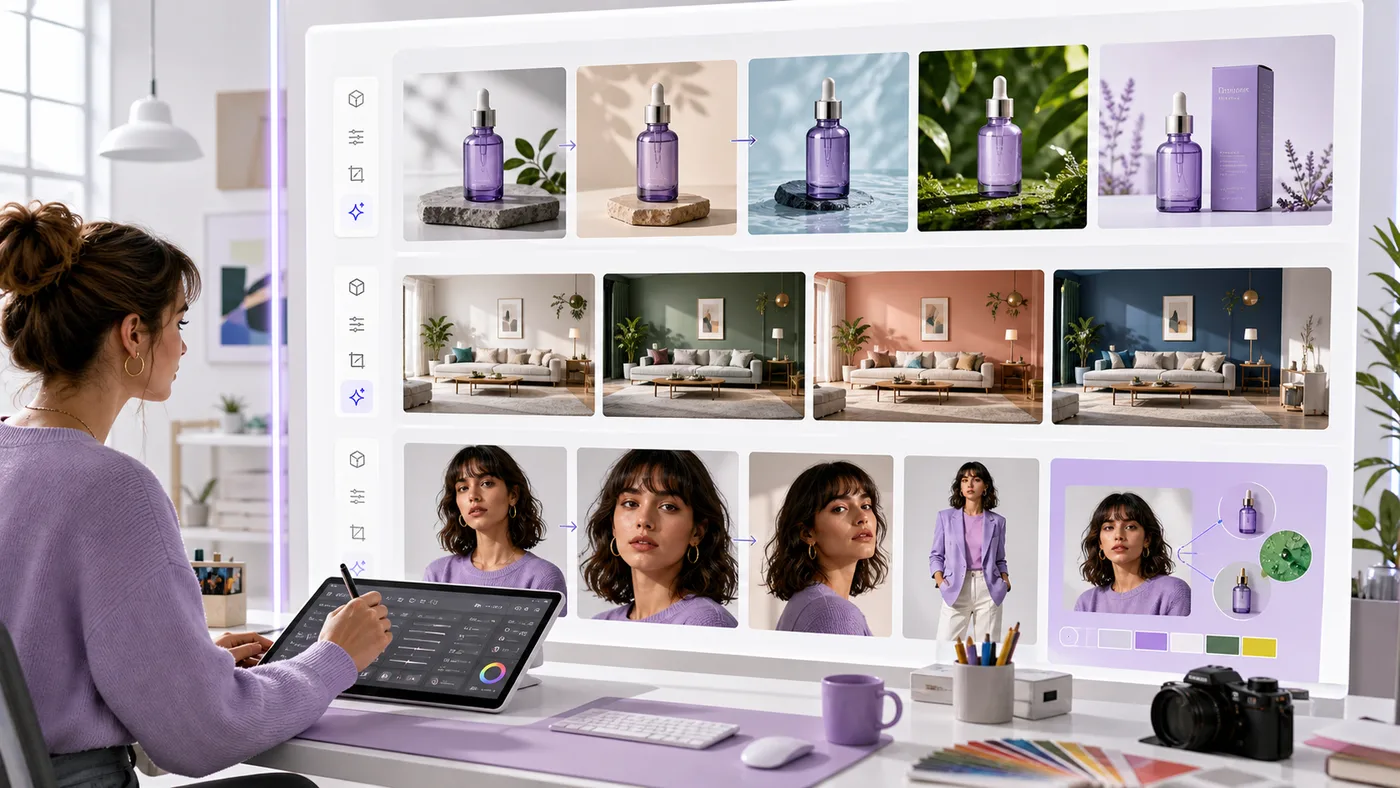
Nano Banana 2 is Google's name for an updated image generation and editing model. Its practical value is not random spectacle. It is fast iteration from text, an existing image or a set of references while preserving the elements that matter.
Published June 7, 2026 · Checked June 7, 2026 · Reading time: 13 min
Practical summary
Products, interiors, consistent portraits, infographics, mockups and edits: what Nano Banana 2 can do and how to avoid misleading visuals.
This content helps you
- understand the topic without jargon
- see concrete use cases
- spot common mistakes
- move forward with a simple method
What is covered
- 1The 30-second answer
- 2What was announced
- 3What the new capability can do
- 4Practical examples
- 5Who may benefit
Section 01 · guide
The 30-second answer
Nano Banana 2 can support campaign visuals, product scenes, targeted edits, mockups and editorial illustrations. A generated concept should still be distinguished from an accurate photograph of a real product.
The useful question is not whether the announcement looks impressive. It is whether the feature improves a real task, saves time after review, fits the budget and keeps important decisions under human control.
Section 02 · guide
What was announced
Google introduced Nano Banana 2 on February 26, 2026 as a fast image generation and editing model, highlighting instruction following, subject consistency and combined generation and editing.
The model sits within the Gemini ecosystem. Depending on the product and account, users can start from text, an existing image or multiple references.
Section 03 · method
What the new capability can do
- 1Keep the same product, person or style across several scenes.
- 2Change a color, material, background or composition without starting over.
- 3Prepare campaign concepts before commissioning a real photo shoot.
- 4Create versions for articles, ads, social platforms and presentations.
- 5Turn a rough idea into a storyboard or art direction.
- 6Prepare an infographic, packaging or interior concept.
- 7Remove an element or test a different environment.
- 8Create educational illustrations.
- 9Localize a visual while preserving the main subject.
- 10Prepare A/B creative variations.
- 11Visualize a product concept that has not been manufactured.
- 12Explore several directions before producing the final asset.
Section 04 · method
Practical examples
A feature becomes valuable when it fits a repeatable workflow. These examples show the difference between a polished demo and work that can be used every week.
- 1An ecommerce team places the same bottle in several environments and keeps only the versions that remain faithful to the real product.
- 2A real-estate agent shows possible wall colors while clearly labeling the result as a simulation.
- 3A trainer creates a consistent five-step illustration series.
- 4An agency prepares a visual storyboard before photography and video production.
- 5A restaurant uses AI for a poster concept but relies on real photography to represent dishes sold.
Section 05 · method
Who may benefit
- 1Ecommerce teams needing many visual variations.
- 2Marketing teams and agencies preparing concepts quickly.
- 3Authors, trainers and publishers needing consistent illustrations.
- 4Designers exploring alternatives before final production.
- 5Small businesses without a studio for every idea.
Section 06 · method
Limits and points to check
Official announcements naturally show the strongest use cases. Before adopting the feature, check availability, privacy, reliability, total review time and the actions the system is allowed to take.
- 1A generated image is not evidence of a product's real appearance.
- 2Brand details, text, hands, proportions and materials require review.
- 3Faces and existing creative works raise rights and consent questions.
- 4Property, product and fashion simulations should be labeled clearly.
- 5Consistency can improve without becoming perfect.
- 6Commercial rights depend on the product and plan used.
Section 07 · method
How to test it without disrupting your workflow
- 1Choose a subject whose details are well known.
- 2Create three versions with one change at a time.
- 3Compare logos, proportions, colors and materials to the reference.
- 4Request a targeted correction instead of regenerating everything.
- 5Ask someone familiar with the product to review the output.
- 6Label simulations where the public may assume the image is real.
Section 08 · guide
What this signals for the next stage of AI
Image creation is becoming iterative rather than one-off. The most useful tools will preserve key details while allowing precise changes.
Professional quality still depends on the brief, references, art direction, review and honesty about what is real or simulated.
Section 09 · guide
Official sources
This article is based on official announcements and documentation available on the publication date. Features, pricing and availability may change after publication.
Sources and useful reading
Frequently asked questions
Is Nano Banana 2 free?
Access and limits depend on the Gemini product, region and subscription shown in the user's account.
Can it edit an existing photo?
Yes, supported interfaces can start from an image and apply changes described in natural language.
Can it be used for product pages?
It can create context and concepts, but the represented product must remain accurate and non-misleading.
How can I keep the same character?
Use consistent references, describe fixed details and change one variable at a time. Review every result.
Related guides
How to use AI in marketing
Content ideas, emails, ads, personas, sales pages and customer analysis.
How to use AI in e-commerce
Product pages, FAQ, emails, support, ads and customer review analysis.
Free AI video generator in 2026: useful use cases, limits and precautions
Use AI video tools to test ideas and create short visuals while checking rights, people and context.
Free AI tools
Use the free English tools to prepare prompts, emails, CVs and automation plans without starting from a blank page.
Explore tools